BF6 Portal Experience · v0.x
TWL Conquest
Conquest the way it should be played - A single code per map: admin-run lobbies, randomized vehicle deploys that kills pad-camping before it starts, and in-world supply boxes for unique per-map gadget tuning. Built first for 8v8 through 12v12 NA & EU competitive matches, but capable of any format size.
Codes for the lobby browser
Conquest (8v8 through 12v12) tuning is in active development — codes appear here the moment a build is signed-off. Bookmark this page; we update on every playtest pass.
| Map | Code | Status | |
|---|---|---|---|
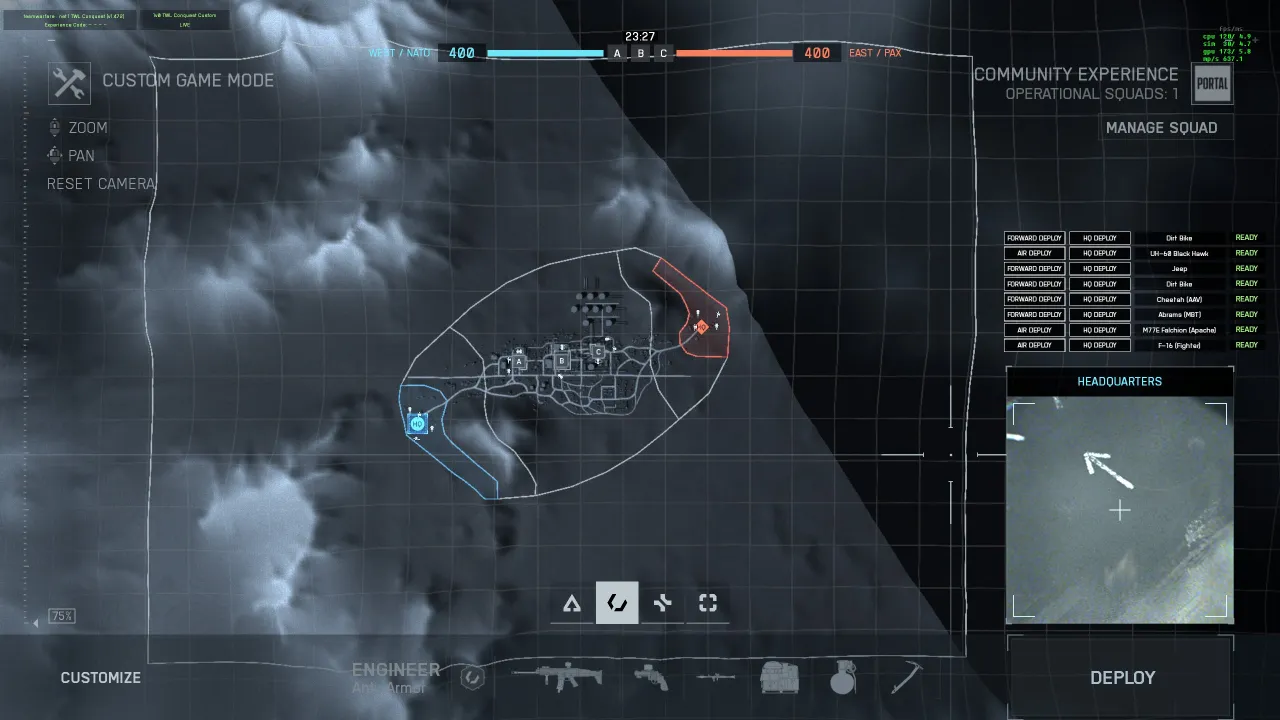
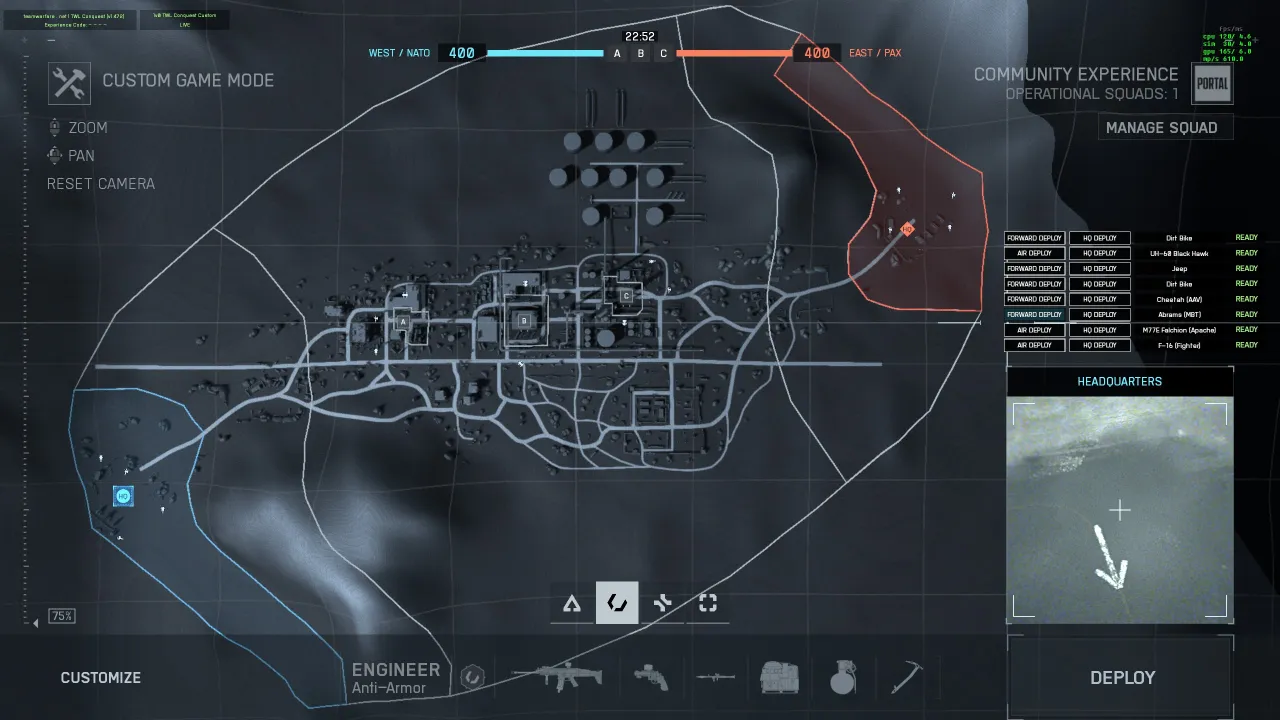
| Operation Firestorm | ZW9DG | Work in progress. Reference layout. Supply boxes & deploy zones tuned. Pictured below. | |
| Containment | —— —— | Tuning in progress. | |
| Hagental Base | —— —— | Tuning in progress. | |
| Mirak Valley | —— —— | Long sightlines — DMR/sniper bans actively evaluated. | |
| Liberation Peak | —— —— | Mountain corridors. Vehicle counts being trimmed. | |
| Golmund Railway | —— —— | Tuning in progress. | |
| Redline Storage | —— —— | Tight industrial lanes — supply box pacing under review. |
Looking for live codes today? Tanks Only 2v2 ( ladder ) and Helis Only 2v2 ( ladder ) are shipping now — codes here .
Built around the things that decide a Conquest match
Vehicle balance, spawn unpredictability, and tightly-scoped gadgets. Every clip below is captured from a live TWL playtest.

Interact with colored smoke. Things happen.
Green smoke at HQ opens the ready-up dialog. Purple opens vehicle deploys. Yellow highlights where to find a Supply Box.
- ▸Green — ready up, swap teams, claim admin, spectate.
- ↳Triple-tap E on-foot anywhere opens this menu directly.
- ▸Purple — deploy into a vehicle (HQ / Forward / Air Deploys).

- ▸Yellow — Supply Box for class-specific gadgets (tuned per map).
TWL preset, or roll your own.
Whoever claims admin gets a pre-match panel: pick a TWL preset, or cycle vehicles, modes and deploy types per team. Unsaved tweaks turn red until you Apply Configuration.
- ▸Presets load full TWL defaults instantly.
- ▸Cycle left/right arrows swap each row's vehicle.
- ▸Custom flips the mode badge so you know you're off-template.
- ▸Give up admin yields the slot to another player at any time.

Choppers spawn airborne in your sky zone.
No more queueing on the helipad while a sniper makes lunch. Helicopters drop in mid-air over a randomized point in your team's aerial corridor — fully fueled and ready to fight.
- ▸Sky zone is a tuned 3D volume per map.
- ▸Never get blown up on the pad again — return to the battle for honest competition.
- ▸Admin toggle — to enable this deployment method, toggle Air Deploy ON so it is checked.

Fighters launch already in the fight.
Same idea, faster aircraft. Jets drop in the high corridor of your sky zone — no taxi, no climb-out, no sitting duck.
- ▸Vanilla mode still available if your admin wants the classic experience.
- ▸Built to stop pad-camping — if the enemy can't predict where/when vehicles appear, you get real competition instead of farming spawns on a timer.
- ▸Real pilots dogfight — ensure one happens on every respawn.
- ▸Admin toggle — to enable this deployment method, toggle Air Deploy ON so it is checked.

Ground vehicles drop close to the action.
Any ground vehicle can get seated at a randomized forward point — anywhere inside your team's push zone. Pad-camping a known spawn no longer works.
- ▸No ticket cost and it doesn't count as a death.
- ▸Randomized radius tuned per map — predictability is the enemy.
- ▸HQ deploy fallback for safe-spawn vehicles.
- ▸Admin toggle — to enable this deployment method, toggle Forward Deploy ON so it is checked.

In-world gadget vending
Interact with the yellow smoke at an objective and you get a class-aware Supply Box. Each button shows its scope, cooldown, and a live timer when locked — no infinite gadget spam, without sacrificing utility.
- ▸Per-objective boxes spawn at capture points during a live match.
- ▸HQ preview lets you test loadouts pre-game without burning a charge.
- ▸Cooldowns persist per player and per team — closing the menu won't reset them.
- ▸Banned items live here when they're Supply-Box-only instead of fully removed (see ruleset).

Shoutcasted matches incoming
A prototype Spectator Fly cam so we can get rolling with streaming now - a temporary solution until DICE provides a better spectator camera in Season 4.
- ▸Embedded & supported for 1 spectator per match.
- ▸Stopgap by design — replaced once Season 4 ships proper spectator tooling.
Where the matches happen
Every map gets its own pass — air-deploy zones, forward-deploy points and supply-box placements are hand-tuned, not copied. Firestorm is the reference layout the others are calibrated against.
Weapon & gadget bans
Items in the Banned column never appear in this experience. Items marked Supply Box are pulled from in-world boxes — they don't appear in the loadout selector. FINAL TUNING IS STILL UNDER REVIEW. THIS LIST IS NOT FINAL.
Class Gadgets
Assault
Medic
Engineer
Recon
Weapons & Optics
Assault Rifles
Carbines
SMGs
LMGs
DMRs
Snipers
Shotguns
Optics & Misc
Your feedback shapes the ruleset
We're benchmarking performance and balance across every map. Drop your match notes, complaints, and edge-case bugs in the forum thread or the Discord channel — the next playtest pass reads directly from those threads.
Built in the open. Fork it, improve it, ship it back.
Every Experience rule, supply-box config, and deploy-zone tuning lives on GitHub. No black box — read the source, copy what works for your community, or open a PR and push the ruleset forward for everyone.
- ▸Transparent — every tuning decision is reviewable in the commit history.
- ▸Forkable — run your own variant for your league or region.
- ▸Community-driven — issues and pull requests directly shape the next playtest.